
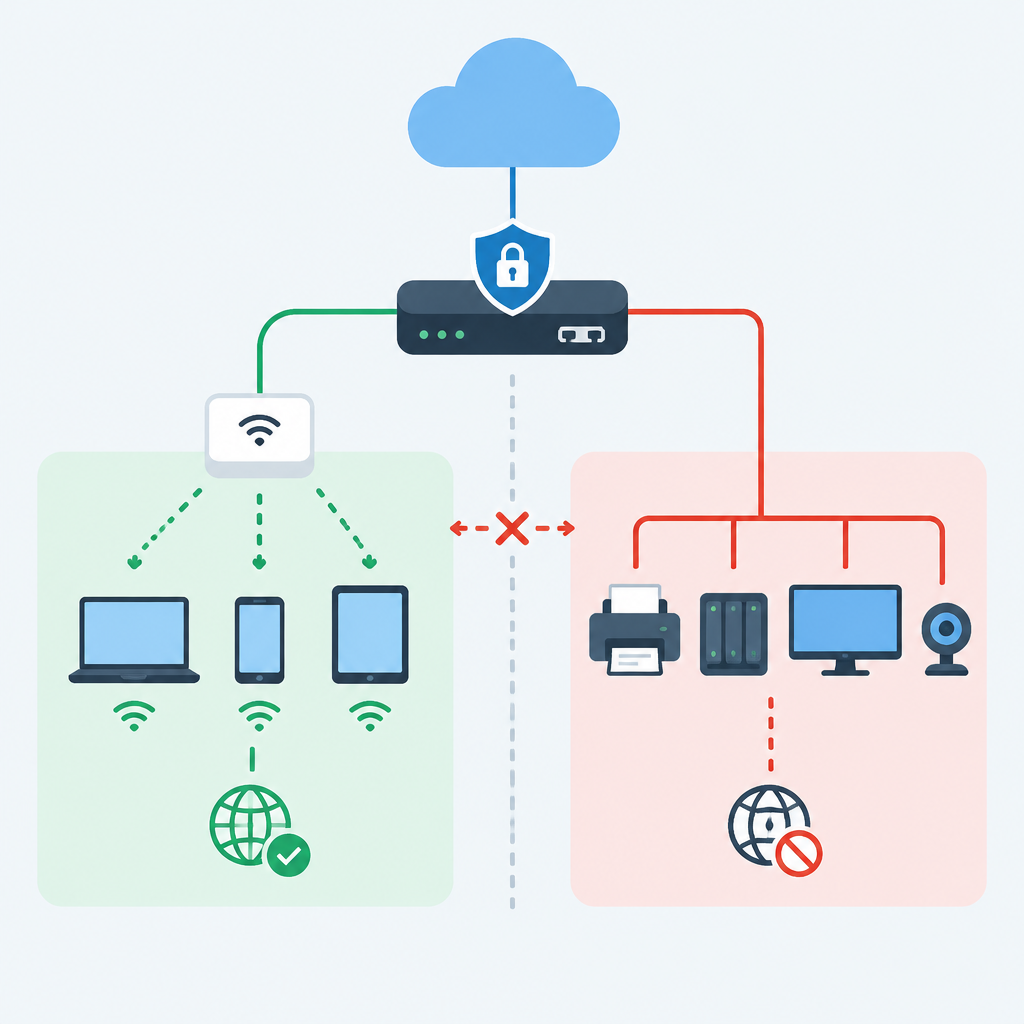
Start With a Boundary, Not a Password
A guest Wi-Fi design should begin with a simple rule: internet access is allowed, but access to internal shared devices is not. That boundary matters because the same wireless radio can carry very different trust levels depending on how traffic is segmented. Before changing anything, list the devices that must remain hidden from guests: printers, file shares, NAS appliances, smart displays, video recorders, admin consoles, and any workstation that stores business data. Then decide whether guests should be completely isolated from each other as well, because that is often the safer default. The first prerequisite is knowing which network resources currently sit on the same subnet, VLAN, or wireless SSID. If the answer is unclear, inspect your existing addressing, switch ports, and DHCP scope so you do not accidentally extend guest access into a shared device network. Keep the objective narrow: one wireless entry point for visitors, one restricted path to the internet, and no routes to internal services unless you intentionally create and verify them.
Map the Existing Network Before You Touch Settings
Planning is easier when you know where the shared devices actually live. Document the current wireless SSIDs, VLANs, IP subnets, DHCP servers, default gateways, and any firewall rules that already separate departments or rooms. If you have a managed switch, note which ports feed access points, printers, conference-room equipment, and any uplinks to a firewall or router. If you use a cloud-managed Wi-Fi platform, inventory the sites, SSIDs, and policy templates that could propagate changes to multiple locations. This step prevents a common mistake: creating a guest network on the wireless side while leaving the wired side flat, which still lets a visitor reach exposed resources if the router bridges traffic too broadly. The safest starting point is a current-state diagram, even if it is rough. Include who administers each layer and where the configuration is stored, because a later rollback may require changing both the wireless controller and the firewall. Stop here if you cannot explain how traffic currently reaches the internet, because isolation without a path map is mostly guesswork.
Choose Isolation Layers That Match Your Equipment
Guest isolation works best when you apply it at more than one layer. At Layer 2, place guests in a dedicated VLAN or equivalent logical segment so their traffic is separated from shared devices before it reaches the broader network. At Layer 3, use routing and firewall policy to permit internet-bound traffic while blocking private address ranges, management networks, and any subnets that host shared resources. At the wireless layer, enable guest client isolation if the hardware supports it, so one visitor cannot browse another visitor’s device list or cast attacks laterally. If your platform offers captive portal features, understand that a login page is not security by itself; it is only an access control workflow. The real protection comes from segmentation and filtering. For small deployments, a separate guest SSID mapped to a guest VLAN is often enough if the firewall is configured carefully. For larger or cloud-managed environments, use role-based policy or group-based access tied to the guest identity. Consult the vendor documentation for the exact feature names, because different products use different labels for the same concept.
Design the Guest Network Policy Before You Create It
Good guest policy is about what is not allowed. Define the destination rules first: internet access permitted, internal RFC1918 networks blocked, management interfaces blocked, and shared-device subnets blocked unless there is a carefully justified exception. Then define the services visitors actually need, such as DNS, HTTP, HTTPS, and perhaps captive portal reachability before authentication. Avoid opening broad port ranges just to make troubleshooting easier, because that usually weakens the separation you are trying to build. Decide whether guests can use local discovery protocols, media casting, or peer-to-peer features; in most environments, the safest answer is no. If you need printing or presentation support for visitors, do not place those devices on the guest network by default. Instead, use a controlled intermediary such as a dedicated presentation workstation or a temporary print workflow with explicit approval. Keep the policy readable so a future administrator can tell at a glance why each exception exists. The best policy is reversible, documented, and narrow enough that an unexpected device cannot quietly become visible just because it shares a hallway or conference room.
Build in a Staged Way and Test on an Owned System
Hypothetical example for practice.
A safe implementation should be staged so you can reverse it without disrupting the entire site. Create the guest SSID or network object, map it to its isolated subnet or VLAN, and apply the outbound-only firewall rules before making it available to visitors. Test using a device you own or control, on a network you are authorized to change. Confirm that the test device receives the correct guest address, reaches the internet, and fails to reach printer IPs, NAS shares, internal gateways, and management pages. If your environment uses cloud controls, verify that policy changes have synchronized to the local site rather than assuming the dashboard reflects the live state immediately. If your platform supports logging, watch for blocked attempts to access internal subnets; those logs are useful proof that your segmentation works. Be prepared to roll back by disabling the new SSID or restoring the previous WLAN profile if basic connectivity fails. Do not proceed to production guests until you can demonstrate both success and denial from the test device, because a partially working guest network can be more dangerous than no guest network at all.
Protect Shared Devices by Limiting Their Reach
Shared devices deserve their own defensive rules because they are often easy targets. Printers, NAS units, meeting-room displays, and smart appliances should not sit on the same permissive segment as guest users. Place them on an internal VLAN or device network with only the minimum necessary inbound access from trusted user subnets. If a printer must be used by staff and visitors, consider a print server or pull-print model rather than exposing the printer directly to every wireless client. For file storage, prefer authenticated shares and avoid making discovery services visible beyond the intended user group. Disable unnecessary services on shared devices, especially admin interfaces that listen on broad interfaces or default ports. If possible, give each shared resource a static reservation, record it in documentation, and review it periodically. This helps because guest isolation is not only about blocking visitors; it is also about ensuring a compromised or misconfigured shared device cannot become a bridge into more sensitive systems. When in doubt, default shared devices to least privilege and add access only after you can justify and verify it.
Validate With Logs, Not Assumptions
After deployment, verification should be systematic. Test from at least one guest client and one staff client so you can confirm the difference between allowed and denied access. Check that guests can resolve public DNS names and browse the internet, but cannot ping, browse, or connect to private subnets, shared printers, NAS shares, or admin panels. Review firewall logs for blocked attempts, DHCP logs for lease assignment, and wireless logs for association or roaming behavior. If your platform supports cloud dashboards, use them to confirm client identity, radio signal quality, and policy application, but do not treat a green dashboard as proof that isolation is correct. Look for common failure patterns: guests getting the wrong subnet, DNS working but web access failing, or captive portal traffic being blocked by an overly strict rule. Stop and fix the smallest problem first, because layered changes can hide the real cause. Good validation also includes a restoration test: disable the guest SSID or revert the last rule set and confirm that the network returns to the previous state. That gives you confidence that you can undo mistakes without guesswork.
Plan for Reversibility, Maintenance, and Common Mistakes
Guest Wi-Fi is not a one-time project; it needs maintenance. Review rules when a shared device is added, when a printer is replaced, when a firewall is readdressed, or when the internet gateway changes. Keep a change log that notes what was modified, why it was done, and how to reverse it. Common mistakes include bridging guest and staff traffic on the same subnet, forgetting to block access to private address ranges, leaving default credentials on shared devices, and enabling device discovery features that defeat segmentation. Another mistake is relying only on a portal splash page and assuming that equals security. It does not. A better practice is to periodically test the guest network from a controlled device, verify that shared resources remain hidden, and confirm that logs still show the expected blocks. If a change breaks business use, revert to the last known-good configuration first, then reintroduce the change more carefully. The stop condition is simple: if you cannot explain how a guest device is prevented from reaching a shared device, the network is not ready yet. Pause, document, and redesign before opening access to visitors.
Post a Comment